Pricing

Free to start.
Pay as views grow.

Three plans, all billed through your Shopify invoice. Install the app, pick a plan inside Shopfluence, approve it in Shopify, done.

Free
$0/ month

For stores trying shoppable video for the first time.

  • 10 shoppable videos
  • 5,000 video views / month
  • Stories, Carousel and Grid widgets
  • Product tagging with Add to Cart
  • Views, clicks and CTR analytics
  • Orders and revenue attribution
  • Additional views beyond the plan
Install free →No card required
Scale
$149/ month

For brands operating at meaningful content volume.

  • Everything in Growth
  • Unlimited shoppable videos
  • 250,000 video views / month
  • Priority support
  • Custom onboarding
  • $10 per 1,000 additional viewsCapped at $1,500 per month
Start with Scale →Billed monthly through Shopify
All plans are billed through the Shopify Billing API. Install the app from the Shopify App Store, pick a plan inside Shopfluence, and approve the charge in your Shopify admin. It appears on your Shopify invoice, and you can change or cancel the plan from the app at any time. Nothing is sold or charged on this website.
Shopfluence · Settings · Billing
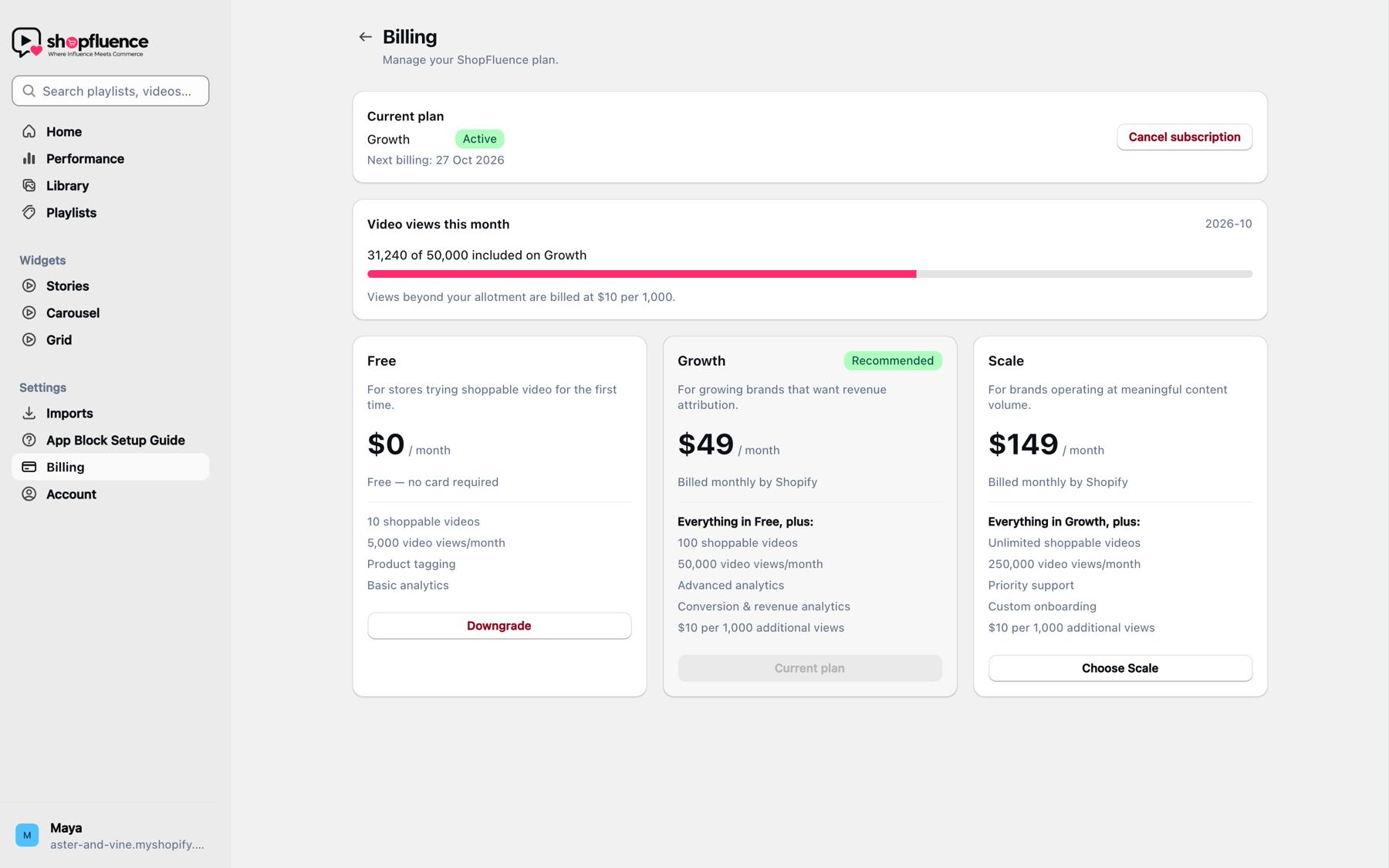
The Billing page inside the Shopfluence app: current plan, video views this month, and the Free, Growth and Scale plan cards marked Billed monthly by Shopify.
Inside the app

You choose the plan in Shopfluence. Shopify handles the charge.

The Billing page shows your current plan, how many of this month’s included views you have used, and the three plans side by side. Choosing one opens Shopify’s own approval screen, so the charge, the invoice and the cancellation all live where the rest of your store’s billing does.

  • Charge approved in your Shopify admin, never on this site
  • Usage for additional views posted to Shopify, capped at the amount you approve
  • Cancel or downgrade from the same page
Compare plans

What changes between plans, and what doesn’t.

Every plan ships the full storefront player and product tagging. Plans differ by number of videos, monthly views and how deep the analytics go.

FeatureFreeGrowthScale
Library
Shoppable videos10100Unlimited
Video views per month5,00050,000250,000
Upload MP4, MOV, MKV, WebM up to 500 MB✓✓✓
Adaptive HLS, auto and custom thumbnails✓✓✓
Playlists with a default per widget✓✓✓
Storefront
Stories, Carousel and Grid widgets✓✓✓
Product tagging, no product limit✓✓✓
Shop Now sheet with Add to Cart and Buy Now✓✓✓
Share links that open a video✓✓✓
Analytics
Views, impressions, clicks, CTR✓✓✓
Daily views chart, top videos, top products✓✓✓
Orders and revenue attribution—✓✓
Conversion rate and average order value—✓✓
Billing and support
Additional viewsDashboard pauses at the capStorefront keeps playing$10 per 1,000Capped at $500 / month$10 per 1,000Capped at $1,500 / month
SupportEmailEmailPriority
Custom onboarding——✓
BillingFreeShopify Billing APIShopify Billing API
Usage, explained

Only full-screen opens count as views.

Shoppers scrolling past a card cost you nothing. When they tap and the player opens, that is one view. Your included views reset each calendar month, and the dashboard always shows where you stand. On paid plans, going over is $10 per 1,000 additional views, posted to Shopify as a usage charge and capped at the amount you approved.

Video views this month31,240 of 50,000
PlanGrowth · $49 / month
Additional views$10 per 1,000 · capped at $500
Sample numbers. Your own usage is on the Billing page inside the app.
Questions

Pricing and billing FAQ

How does billing work?

Every paid plan is a recurring app charge through the Shopify Billing API. After you install Shopfluence from the Shopify App Store, open Billing inside the app, choose Growth or Scale, and approve the charge on the Shopify confirmation screen. It then appears on your regular Shopify invoice. This website does not take payments.

Is there a free trial?

No. Instead there is a Free plan with 10 videos and 5,000 views a month that you can stay on as long as you like, and you can upgrade from inside the app when you need more.

What counts as a view?

A view is a full-screen open of a video, for example tapping a story circle or a carousel card. Cards that merely scroll past the shopper are impressions and are not counted. Views reset at the start of each calendar month (UTC).

What happens when I pass my monthly views?

On Growth and Scale, additional views are billed as a Shopify usage charge at $10 per 1,000 views, and only completed blocks of 1,000 are charged. The total is capped at $500 a month on Growth and $1,500 on Scale; you approve that cap when you choose the plan. On Free, the dashboard pauses at 5,000 views until the next month while your storefront keeps playing videos.

Can I change or cancel my plan?

Yes, from Billing inside the app. Upgrades create a new charge that starts when you approve it. Cancelling or downgrading moves the store to Free at the end of the current period, and uninstalling the app cancels the subscription. See the Refund & Cancellation Policy.

Which Shopify themes work?

Any Online Store 2.0 theme that supports app blocks, which includes every free Shopify theme. You switch on the Shopfluence app embed and add a Stories, Carousel or Grid block from the theme editor.

Is there a limit on tagged products?

No. Tag as many products on as many videos as you like on every plan. Plans differ by number of videos, monthly views and analytics depth.

Can I import videos from Instagram or TikTok?

Uploading files is the primary way to add videos. You can also connect an Instagram or Facebook account from the Shopfluence web app to sync videos you already own. TikTok and YouTube are not supported.

Start on Free. Upgrade when the views arrive.

Install from the Shopify App Store today. Choosing a paid plan later takes one click inside the app and one approval in Shopify.